Kithara »Realtime Suite«

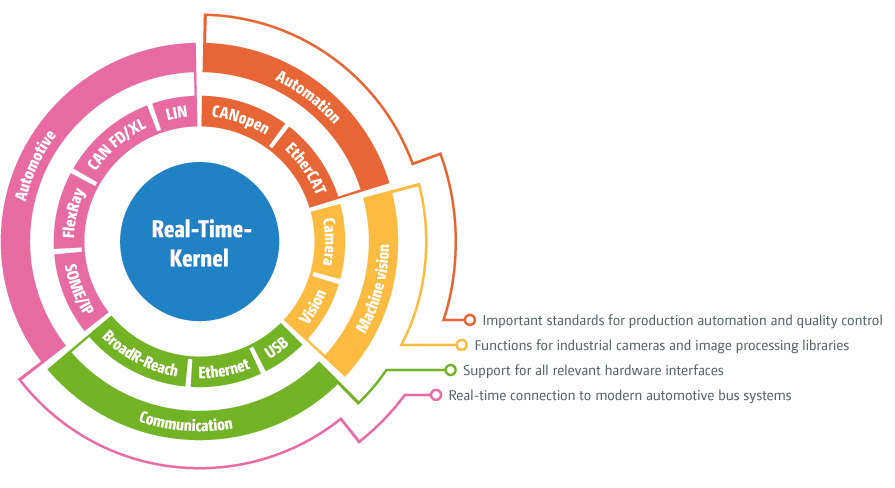
The »RealTime Suite« is a real-time enhancement for Windows operating systems.It is used to set up industrial applications for automation, control systems and engineering in real-time.
The need for "hard" real-time property is the accomplishment of your application code on the kernel level. We provide the necessary mechanisms to achieve this.
Some basic information:
- High precision real-time timer for frequencies > 1 kHz
- Priority based preemptive real-time multitasking
- Real-time automation via own EtherCAT Master
- Real-time CAN with multiple vendors supported (IXXAT, Peak, EMS)
- Event controlled UDP and TCP communication in real-time via Fast Ethernet (100 MBit/s) and Gigabit Ethernet (1 GBit/s)
- Hardware dependent programming: I/O ports, phys. memory, interrupts
- Supportig PCI and PCMCIA cards, USB devices, serial COM interfaces
- Windows 7 - Windows Vista (x86) - Windows XP (Embedded) - Windows Server 2003 - Windows 2000
- Code accomplishment on kernel level supports C/C++ and Delphi (Win32)
- Description
- Features
- Examples
- FAQ
- Hardware
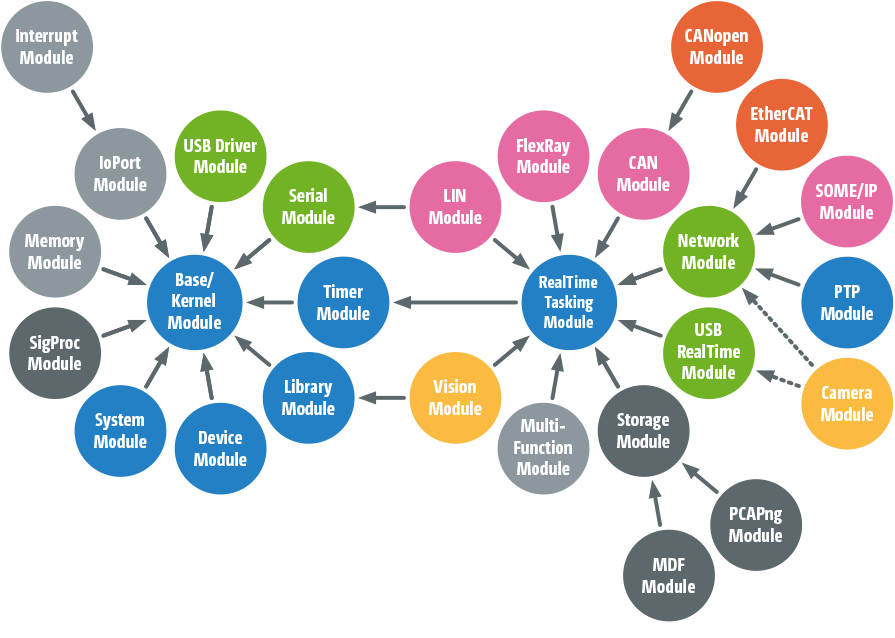
The Base Module is the foundation of the whole »RealTime Suite«.
Create all needed resources, that enable for example the communication between application and kernel level!
The Base Module provides functions to administer the kernel driver. Therefore »RealTime Suite« can be used by several programs at the same time.
The Base Module contains functions to create and administer the following resources:
- Shared Memory
- Data and message pipes for quick data exchange
- Event objects
- CallBack functions
- Threads
- Fast mutex objects
Furthermore, the Base Module contains additional functions to deliver information to the »Kernel Tracer«. This allows to make debugging and problem-solving more comfortable.
Pay attention to the Kernel Module, that provides more universal functions and is essential to access the kernel level.
The Base Module is always required.
- General functions
- Open/close the kernel
- Version control, driver configuration
- Threads
- Creating threads
- Determine/set desired values of absolute thread priority
- Shared memory
- Shared memory especially for data exchange
- Protected from swapping to hard disk (memory will be fixed in memory)
- Multiple memory blocks with up to 60 MByte each
- Pipes
- Lock-free and fast data pipes and message pipes
- Enables comfortable and synchronized data exchange in desired direction between kernel and application
- Needs no additional synchronisation (supports multi-core CPUs)
- Signalizing
- Event objects: set, reset and pulse to activate an application thread
- Callback execution of user code on kernel or application level
- Sending Windows messages
- Fast mutex objects
- Fast synchronisation ("Mutex" = Mutual Exclusion)
- Multi-processor suitable
- Device information
- Detection of device information of PCI-, USB-, COM-, HID-Devices etc.
- Debug support
- Sending formatted text messages from kernel level
- Compatible to »Kernel Tracer« for profiling and debugging
The Base Module provides multiple functions, e.g. shared memory for data exchange between application and kernel:
err = KS_createSharedMem(
&pAppPtr, // Application address
&pSysPtr, // System address of memory
"MySharedMem", // Globally valid name
40 * MegaBytes, // Length in bytes
0); // Flags, here 0
For the simplification of periodical data exchange is it ideal to use a data pipe, which is also based on shared memory:
err = KS_createPipe(
&hPipe, // Address of pipe handle
"MyValuePipe", // Name of pipe
2, // Data size (e.g. measurement values)
1000000, // max. number of data elements
NULL, // reserved
0); // Flags, here 0
Now you can deposit the measured values in the pipe:
err = KS_putPipe(
hPipe, // Pipe handle
valueBuffer, // Pointer to data buffer
valueCount, // Number of values
NULL, // Not used here
0); // Flags, here 0
Application can read measured values from the pipe:
err = KS_getPipe(
hPipe, // Pipe handle
buffer, // Pointer to data buffer
bufferSize, // max. number of values
&filledSize, // How many values read?
0); // Flags, here 0
Variable-length data (e.g. messages) can be best handled with a message pipe. The usage is similar to the above mentioned way.
- Required qualifications
- Support of single or dual-core, multi-core CPUs, Hyperthreading, SMP etc.
- Support of standard PIC or APIC, ACPI
- Best platform would be a dual-/quad-core PC (with APIC + ACPI)
- Support of Windows Vista (x86), Windows Server 2003, Windows XP (Embedded), Windows 2000, Windows 7
- Programming on kernel level in C/C++ and Delphi (Win32)
- What are the special characteristics of shared memory?
- No hard-disk storage, thats means it is always available (also in real-time settings)
- Accessible from application and also from kernel level
- It exists exactly once, thats means it can also be used for data exchange between different applications (but in each program KS_createSharedMem has to be called)
- The memory is initialized with 0—a counter is checking, if the the memory is used from an other program
- Access to memory is not automatically synchonized (for synchonized access we recommend data pipes and message pipes)
There is no special hardware needed.
Real-time capability can only be achieved on the kernel level.
Bring your application code to the kernel level and gain access to the real-time world under Windows!
C/C++ compilers or the development environment Delphi (Win32) is required to generate native x86 code. Please consider that the .NET environment with C# is generally also supported, while only a native C++ or Delphi DLL can be used for kernel execution. Appropriate projects which are immediately compileable are provided in every software delivery.
There are two different ways to bring your source code to the kernel level:
- Instruction-wise relocation of a callback function and its sub-routines into the kernel address space
- Loading a DLL directly to the kernel level
Whereas the first method can have more advantages for short projects, the second option provides even more opportunities and allows for instance a simple creation of debug messages, which can be used in the »Kernel Tracer« for a solving problems.
Furthermore, you can realize complex control applications with a graphical interface which was created in e.g. Java or C#.NET, while only the time critical code parts are running in kernel mode.
The Kernel Module is required to execute application code on the kernel level.
- Tracing callback functions and their sub routines
- Direct loading of a DLL on the kernel level
- DLL can be created with C/C++ or Delphi (Win32)
- Callback functions will be directly executed in the interrupt service routine (ISR) or in real-time timer context
- All important functions of the »RealTime Suite« are also executable on kernel level, e.g.:
- I/O port access
- Access to physical memory
- Measuring system time and precise short-time delays
- Data communication over data- and message-pipes
- Sending and receiving over serial interfaces
- Sending and receiving over Ethernet network connections
- EtherCAT process data exchange in automation solutions
- Setting events (also reset, pulse)
- Events from kernel level: events and Windows messages
- Faster data-exchange between application and kernel via shared memory or lock-free data and message pipes
Assuming that your callback-function for the real-time timer looks like that:
int __stdcall myTimerCallback(
void* pArgs, // Address of reference data
void* pContext); // Address of context data
There are two ways to get the user code to the kernel level:
err = KS_createCallBack(
&hCallBack, // Address of handle
myTimerCallback, // Address of function
pSysAddrOfMyData, // Reference parameter
KSF_KERNEL_EXEC, // on the kernel level!
0); // Application priority, here 0
This way a function is loaded into the kernel memory.
Alternativly, you load a whole DDL into the kernel:
err = KS_loadKernel(
&hKernel, // Address of handle
"mykernel.dll", // File name of kernel DLL
"myInitFunction", // Name of init routine
pArgs, // Reference parameter
KSF_KERNEL_EXEC); // Flags, load into kernel
If it is once loaded in the kernel, you can create a kernel callback:
err = KS_createKernelCallBack(
&hCallBack, // Address of handle
hKernel, // Kernel Handle
"myTimerCallback", // Name of function
pSysAddrOfMyData, // Reference parameter
KSF_KERNEL_EXEC, // on the kernel level!
0); // Application priority, here 0
The callback handles can now be used as timer or interrupt handlers or to a real-time signalization for incoming Ethernet frames.
Hint:Complete Projects, for applications in languages like C++, C# or Delphi and also DDLs, which are loaded into kernel in C++ or Delphi, are components of every software delivery.
- How can kernel communicate with the application?
- Shared memory areas for not synchronizied data exchange
- Data and message pipes based on shared memory (lock-free, therefore are the reading and the writing site synchronizied against each other)
- Kernel can set event objects to activate application threads
- The application level can trigger a execution of function in kernel
- Windows messages
- How to debug code for the kernel level?
- User code can be debuged in the developing area:
- Callback function will be executed on the application level by a special flag
- Kernel DLL will be loaded on the application level by a special flag
- Shared memory, events, access to I/O ports and physical memory etc. are available for both contexts
There is no special hardware needed.
The IoPort Module enables access to the I/O register of computers.
Get directly access to the I/O ports of the computer with the IoPort Module from the application!
Implemented hardware assemblies/mezzanine and PC cards can be controlled by controllers with a access to the I/O register. Therefore are functions for 8, 16 and 32 bit access available.
The IoPort Module is also required to trace the hardware resources (e.g. memory address or interrupt lines), which were dynamical allocated by Plug&Play-Manager from Windows.
The term "I/O Ports" does not mean COM ports or LPT ports, but rather the altogether 65536 I/O machine commands for all available I/O addresses of the system. Therewith you can control the I/O register of COM and LPT-controllers.
Add the Memory Module to your Custom Driver, if the hardware you want to use provides memory access.
- I/O port access
- Enable direct access to I/O ports
- I/O access from application program without context change possible
- Access protection for operating system, for all unenabled address still intact und active
- Only own application gets access to addresses
- No limitaions for the system
- Functions for direct and indirect I/O access
- 8, 16 and 32bit access, reading or writing
- Functions compatible to (under DOS) known C Makros
- Resource tracing
- Tracing of allocated rescoures from Plug&Play-Manager (Basis addresses, IRQs)
- Reading and writing of PCI configuration block
If you want to use direct I/O port access, you have to enable the I/O area for the direct access:
err = KS_enableIoRange(
myBaseAddress, // Basis addresses of hardware
8, // Number of I/O register
KSF_SIZE_8_BIT); // Flags, here byte-wise
Now, you can address the enabled hardware-register:
byte value = KS_inpb(
myBaseAddress + 2); // Address, 1 byte read
... // Byte analyse
KS_outpb(
myBaseAddress + 4, // Address, 1 byte write
value); // Byte write
If the I/O basis address of a PCI card is dynamical allocated from the Plug&Play-Manager, is it easy to trace by either all PCI assemblies will be browsed till the the vendor and device id is founded:
err = KS_getBusData(
&pciData, // Address of PCI-structure
busNumber, // Bus-number
slotNumber, // Device number and function
0); // Flags, here 0
if (pciData.vendorID == XXXX && pciData.deviceID == YYYY)
...
Or immediatly browsed by the desired id combination:
err = KS_getRessourceInfo(
"PCI\\VENxxxx&DEVyyyy", // ID combination
&resourceInfo); // Address of resource info
The received data structures containing all necessary information about interrupt lines and used I/O or memory basis addresses.
- How to trace the rescources, which were dynamical allocated by the PCI Plug&Play ?
- Either with 'KS_getBusData': Iterate all PCI devices in system until the searched parameter (vendor id, device id, etc.)is founded
- or with 'KS_getResourceInfoEx': Delivering parameter of the searched device and result of described data structure
- with 'KS_getResourceInfo' you can data from other interfaces like serical (COM) or parallel (LPT) or from network cards (NET) for the Packet Module and USB devices
There is no special hardware needed.
The Memory Module gives you access to the physical memory.
Get directly access to the external memory of integeration cards or provide internal RAM for the hardware access
The Memory Modul enables the usage of physical memory in your application and also for external hardware. There are two different kinds of memory areas:
- External memory areas of integration cards (also called Dual Port RAM) can be addressed by application
- Memory areas from internal main memory can be provided or external hardware (also called DMA memory)
The result of both cases is the same: The application (and also the kernel level) and the external hardware (e.g. PCI bus) get access to the memory. This will be shown in the address room of the application – that means, there will be no more needless copying operations, which causes the suitability of time critical applications.
This can be important for some applications, because access via I/O ports will be shortened to guarantee compatibility to older hardware components ( partly ? 1 µs!). Favoured applications are: measurement value logging, communication, framegrabber for image processing etc., therefore all applications, which have to transport big data amounts very fast.
The Memory Module is only used for memory access. For the addressing of I/O ports please note IoPort Module.
- External memory
- Blending exteral Dual Port RAM into the address room of application
- Different addresses for application and kernel level
- Direct access – no software emulation or copying operation
- Internal memory
- Providing internal main memory for external hardware on ISA or PCI bus
- Physical memory
- Physical address can be delivered to the external hardware in an own way
- For an enhancement of allocated block sizes is it possible to request the memory while booting
The blending of external memory areas (Dual Port RAM) of a PCI card into the address room of the application and kernels takes place like:
err = KS_mapPhysMem(
&pAppPtr, // Application address
&pSysPtr, // System address of memory
externalPhysAddr, // physical address
externalSize, // Length of memory area
KSF_PCI_BUS); // Flags, here PCI bus
The allocating of internal memory areas of the PC RAM for access by external hardware takes place like:
err = KS_allocPhysMem(
&pAppPtr, // Application address
&pSysPtr, // System addresss of memory
&externalPhysAddr, // physical address
externalSize, // Length of memory area
KSF_PCI_BUS); // Flags, here PCI-Bus
The physical address can be delivered to the hardware to get access to the memory via PCI bus.
Both methods come to the conclusion, that application, the kernel and the external hardware are able to get directly access (withput emulation or copying operations) to the same memory.
- How big is the maximal .. area for external memory?
- Basically, its as big as the external memory; there shall be no limitations
- How big is the maximal allocating area for internal memory?
- The memory has to be physical continuous, therefore it is even more less, so long the system is running. Therefore, the memory should be requested as soon as possible after the boot. The system memory will be fragmented very fast from the operating system.
- Memory Module contains mechanisms to allcate memory areas while booting, which can be requested from the application.
- Additionally, it is possible to allocate multiple little than one big area. Its recommend to use the "scatter/gather" management of the memory.
There is no special hardware needed.
The Clock Module makes precise time measurement possible.
Detect the exact system time in different formats or realize exact short time delays!
In hardware dependent applications an exact system time has to be detected for different aims. The Clock Module provides functions to deliver the exact system time in different formats. You can choose between relative and absolute time specifications, or define a format yourself for specific requirements.
The time measuring is based on different and selectable time emitter (e.g. Time Stamp Counter (TSC), PC Timer, PM Timer, APIC Timer, HPET Timer), which are included in every system. Internal differences for the conversion are impossible for years, by reason of the 64 and 96 bit calculations.
Exact time delays are necessary for the hardware dependent programming. But the Clock Module is providing it.
The Clock Module is a qualification for the RealTime Module and it is always a valuable addition for different jobs.
- Time measuning
- System time is based on different internal time emiter
- Internal calculations with high precision 64 and 96 bit algorithms
- Relative time formats since system start
- Absolute time formats in common formats:
- Tenths microseconds since 1.1.1601 (Windows system time)
- Microseconds since 1.1.1970 (Unix system time)
- Milliseconds since 1.1.1980 (DOS system time)
- Absolute time data for local time zone or UTC
- All time emitter are calibrated against each other at system start
- Customized time formats are easy to define
- 2 phases time measuring (1. compilation, 2. subsequent conversion) for extreme time critical applications
- Short-time delay
- High precision short-time delays in tenths microseconds programmable
- Complex calibration at system start enables accuracy in nanosecond resolution (on kernel level)
The Clock Module provides two mechanisms – time measuring and short-time delay.
The most used function to time measuring delivers 100 ns units since system start:
UInt64 time;
err = KS_getClock(
&time, // Address of variable
KS_CLOCK_MACHINE_TIME); // 100 ns since system start
For processing , converting into 64-bit-values:
__int64 time64 = time.hi;
time64 <<= 32;
time64 += time.lo;
printf("%Ld Mikrosekunden seit dem Systemstart.\n", time64 / 10);
You also can get the absolute point of time since 1.1.1601 :
err = KS_getClock(
&time, // Address of variable
KS_CLOCK_ABSOLUTE_TIME); // 100-ns seit 1.1.1601
If you want to process with the received value you can easily use Windows functions.
The short-time delay realizes high precision delays, programmable in 100 ns steps with a difference in a few nanoseconds (on kernel level):
err = KS_microDelay(
38); // here 3,8 microseconds
Thats frequently usefull for access to hardware, if you have to keep in time conditions.
- Required qualifications
- Support of Single or Dual Core, Multi Core CPUs, Hyperthreading, SMP etc.
There is no special hardware needed.
The System Module informs you about special system events.
Let you inform about starting and stopping of applications or critical situations!
The System Module allows to announce an information function for determined critical system events, which appears, when such a situation happend. In this case, you can e.g. see a reaction if an application programm crashes to set a plugged hardware into safety shutdown.
The reaction is generally on kernel level.
Requires the Kernel Module.
- Announcement of callback functions on kernel level
- Calling callback function, if special events happening
- Start of other applications, which are also using kernel driver
- Quitting applications (for regular and faulty programm end)
- Compilation of programm abortion in Debugger, Task Manager or programm crashes
- Signalisation for BSOD (i.V.)
You can simply make sure, that if your application programm has got an error your system will directed in a safety state. Create a callback function for the kernel level to reach this:
int __stdcall myEmergencyCallback(
void* pArgs, // Address of reference data
void* pContext); // Address of context data
Therefore, a callback object will be created:
err = KS_createCallBack(
&hCallBack, // Address of handle
myEmergencyCallback, // Address of function
pSysAddrOfMyData, // Reference parameter
KSF_DIRECT_EXEC, // on kernel level!
0); // Application priority, here 0
This Callback function will be announced as system handle:
err = KS_installSystemHandler(
KS_SYSTEM_PROCESS_ABORT, // on programm abortion
hCallBack, // Callback handle
0); // Flags, here 0
If there is a unexpected programm abortions without logging off all used resources, the emergency callback function appears.
"Unexpected program abortions" are e.g. a program crash or the abortion by Task Manager or the debugger in developing area.
- How is it guaranteed, that the emergency function will be executed even the application doesnt exsist anymore?
- The Emergency function needs all necessary data if this case happens. All these information have to be prepared and delivered to the shared memory. The function will not access to the application data or code if it is called, anymore.
There is no special hardware needed.
The Device Module provides the Windows device API.
Enable available ("Legacy") application to access via Windows interfaces for devices, including "virtual COM ports"!
The Device Modules anncounces callback functions, which will be executed on kernel level, if an unknown application opens or closes device interfaces or reads/writes data or changes configuration. The used Windows functions are CreateFile, CloseHandle, ReadFile, WriteFile and DeviceIoControl. These five functions are altogehter the device API, which is also used in other operating systems for the device controlling.
Get everything to know about all happening events on kernel level and realize your own driver implementation for USB or PCI assemblies. You can also realize "virtual COM ports" with the Device Module in a simply way. The unknown application gets a serial interface, which can not be differenced to a physical interface.
For manipulation of serial data flow and more options for "virtual COM ports", please not the the Filter Module.
Requires theKernel Module.
- Interception of function calls of CreateFile, CloseHandle, ReadFile, WriteFile and DeviceIoControl
- Reaction on kernel level allows an immedialtely reaction
- For data exchange with application it is recommend to use e.g. the comfortable data or message pipes
- Set any name for device interface
- "Virtual COM ports" can be easily created
For the realization of a "virtual COM port" you can create different callback rountines for the following events CREATE, CLOSE, READ, WRITE and CONTROL. E.g. for CONTROL:
int __stdcall myControlCallback(
void* pArgs, // Address of reference data
void* pContext) // Address of context data
{ ...
if (pContext->controlCode == SERIAL_SET_BAUD_RATE)
...
Callback objekts will be created for all routines:
err = KS_createCallBack(
&functions.hOnControl, // Address of handle
myControlCallback, // Address of function
pSysAddrOfMyData, // Reference parameter
KSF_DIRECT_EXEC, // on kernel level!
0); // Application priority , here 0
Afterwards, "virtual COM ports" can be created:
err = KS_createDevice(
&pAppPtr->hDevice_, // Address of handle
"COM77", // Device name
&functions, // Structure with callback handle
KSF_SERIAL_PORT); // Flags, "virtual COM port"
Therewith are other applications for another serial interfaces under the name "COM77" available, which can not be differenced to "real" interfaces. You also can operate with existing application and you dont have to programm they new.
- What applications can be realized with the Device Module?
- The Device Module provides a granting for a programmable interface for other application developer, e.g. for your USB- or PCI- driver. You can provide an interfaces, which can be easily called by functions of Win32 API. Thats why the documentation of API is quite simpler.
- It is also possible to provide so-called "virutal COM interfaces", which can be opened and handled from application programs like it would be a real COM port.
There is no special hardware needed.
Catch, manipulate, simulate keyboard input!
Decide by yourself, what PS/2 keyboard inputs are allowed!
The Keyboard Module allows control of PS/2 keyboards. It is possible to lock keyboard input combinations (e.g. Ctrl-Alt-Del), which are invailid for the operator of a machine.
By a reason of a registering of a callback function is it also possible to catch a key activity and to convert this into other code or to simulate a key input.
Requires the Kernel Module.
- Locking of determined key input combinations,e.g. Ctrl-Alt-Del, Alt-Tab, Ctrl-Esc etc.
- Changing of key code
- Simulation of key inputs
- Only available for PS/2 keyboards
It is quite easy possible to declare special key codes for kernel functions on a PS/2 keyboard. Assuming, we want to have a special handling for Ctrl-Shift-Alt-F1:
int __stdcall myKeyboardCallBack(
void* pArgs, // Address of reference data
void* pContext) // Address of context data
{ ...
if ((pUserContext->modifier & KSF_KEY_SHIFT) != 0 &&
(pUserContext->modifier & KSF_KEY_CTRL) != 0 &&
(pUserContext->modifier & KSF_KEY_ALT) != 0 &&
(pUserContext->key == 0x3B))
specialF1Handler(); // Spezial F1-routines
...
This function can be announced as handler:
err = KS_createKeyHandler(
KSF_KEY_FUNCTION, // Catch only function keys
hSpecialF1CallBack, // Handler, here callback
0); // Flags, here 0
In industrial facilities is it frequently desired to lock special keys for the operator. These are e.g. the Windows keys , Ctrl-Alt-Del, Ctrl-Esc, Alt-Esc and Alt-Tab. To lock these you only have to call the following function:
err = KS_createKeyHandler(
KSF_KEY_SYSTEM, // All system keys
NULL, // No handler required
KSF_IGNORE_KEY); // Ignoring keys
- What kinds of keyboards can be used with the Keyboard Module?
- At present, you can only use keyboards, which are attachted on a PS/2 adapter.
There is no special hardware needed.
Filter serial data streams with the Filter Module!
Protocol or change data flow on serial interfaces!
The Filter Module allows to protocol and to filter the transfered data on a serial interface.
You can redirect data to other interfaces e.g. sending via a network interface. It is also possible to simulate devices – e.g. as a testing object – or the complete replacement, which comes from the performance of the PC.
The aim is, to use programs, which are dimensioned for serial interfaces even if they have no COM interface. This intervention is transparent for all applications, because all data and evetns of the data flow will be redireced to the installed handler.
If you handle with passive application or with the creation of virtual COM ports, please note Device Module
Requires the Kernel Module.
- Synchronized or asynchronized intervention in the data flow on kernel level
- "Virtual COM port" to fake "real COM interfaces" are included in delivery
- Request and complete events can be analyzed apart
- Possible events: Open, Close, Read, Write, Control
- Data packets can be completely simulated or deleted
The data flow on serial interfaces can be monitored or logged. To do this you have to collect all WRITE-Request and all READ-Complete calls. The data will be redirected via message-pipes:
int __stdcall mySerialFilterCallBack(
void* pArgs, // Address of reference data
void* pContext) // Address of context data
{ ...
if ((pUserContext->ctxType == KS_FILTER_WRITE_REQUEST)
err = KS_putPipe(
pData->hWrPipe, // Pipe handle
pContext->pBytes, // Data
pContext->length, // Length
NULL, 0);
if ((pUserContext->ctxType == KS_FILTER_READ_COMPLETE)
err = KS_putPipe(
pData->hRdrPipe, // Pipe handle
pContext->pBytes, // Data
pContext->length, // Length
NULL, 0);
...
A filter will be created, if the interface is not opened:
err = KS_createFilter(
&hFilter, // Address of filter handle
"COM1", // Name of port
0); // Flags, here 0
The function can be announced as handler:
err = KS_installFilterHandler(
hFilter, // Filter handle
KS_FILTER_WRITE_REQUEST, // Events
hSerialFilterCallBack, // Handler, here callback
0); // Flags, here 0
err = KS_installFilterHandler(
hFilter, // Filter handle
KS_FILTER_READ_COMPLETE, // Events
hSerialFilterCallBack, // Handler, here callback
0); // Flags, hEre 0
- What applications can be realized with the Filter Module?
- Providing "virtual COM ports" (note Device Module, it is quite easier)
- Protocol data traffic via existing interfaces
- Manipulate existing data flow
There is no special hardware needed.
The Interrupt Module provides the handling of hardware interrupts.
Realize handler for hardware interrupts of ISA and PCI bus assemblies in the application programming!
In the hardware dependent programming, e.g. developing of device driver, it is frequently necessary to analyse the events of hardware assemblies. The Interrupt Module allows the announcing of interrupt handler for integration cards on ISA and PCI bus and for their internal assemblies.
The Interrupt handling can be on kernel or application level. But you have to quit PCI interrupts on kernel level. You can register more than one handler for an Interrupt. E.g. a short function for the quitting of IRQs on kernel level and additionally a further function on application level for the essentially analysis of the interrupt.
If you want to call USB hardware, please note theUSB Module.
Requieres the Kernel Module.
- Announcing interrupt handler for ISA and PCI interrupts
- Handling on application or kernel level (Quitting of PCI IRQs only in kernel)
- Supporting all PCI bus types including PCI-Express
- Calling kernel function immediately in context of Interrupt Service Routine (ISR)
- Supporting ACPI, PIC, APIC and Multiprocessor computer (Dual Core, Quad Core etc.)
- Temporary locking of interrupt handling possible
- Kernel driver of »RealTime Suite« is even able to be configured as WDM driver for PCI Plug&Play
Assuming, the following callback function configurated as interrupt handler:
int __stdcall myInterruptHandler(
void* pArgs, // Address of reference data
void* pContext); // Address of context data
If you want to create callback objects with the flag KSF_DIRECT_EXEC , please note Kernel Module.
If you want to announce an interrupt handler, you have to detect the resource information at first :
KSResourceInfoEx info;
err = KS_getResourceInfoEx(
"PCI\\VEN_10ec&DEV_8139",// Hardware-ID of PCI card
&info); // To filling info structure
Therewith you can announce the Interrupt handler:
err = KS_createDeviceInterrupt(
&hInterrupt, // Address of handle
&info, // Info structure
hCallBack, // Callback handle
KSF_ACCEPT_PENDING |
KSF_PCI_INTERRUPT); // Flags, here PCI
You can announce multiple handler for the same IRQ, e.g. a callback function for the kernel level and one further within the application context.
- How is the support of Plug&Play mechanisms working?
- The particular driver of the »RealTime Suite« is usable as Plug&Play driver. For this purpose you have to extend your installation text file (*.INF) with one entry. This entry contains the specifications of PCI card or USB device.
- How to detect the used interrupt line(Plug&Play)?
- It is easy to detect the dynamically allocated resource information from the PCI Plug&Play manager. Please note IoPort Module.
There is no special hardware needed.
The Serial Module provides serial communication in real-time.
Realize extensive serial communication protocols under Windows!
The Serial Module supports two different modes: either serial communication via all COM interfaces of the PC without real-time or serial communication in real-time und direct hardware controlling via UART 16550 and higher.
The Serial Module allows to realize communication application for serial COM interfaces in a simlpy way. It is simpler to difference between the two different kinds of signalization than it is for the Windows API: blocking the call until the send or receive order has finished, signalization by callback or event – which can be found in all other modules.
The Serial Module allows the realization of almost all individual and complex industrial communication protocols in its real-time mode. By a reason of a efficient kernel driver is it possible to get timed high precision reactions on all interface events and to influence directly the hardware on kernel level. The API in both modi is the same.
For an addition of "virtual COM ports", please note Device Module
Requires the Kernel Module.
- Serial communication via all COM interfaces of the pc on Windows mechanisms or in real-time by UART hardware support from 16450 to 16950
- Flexible reaction on incoming data and events by blocking, callback or event
- Listing of all COM interfaces in PC (Base Module)
- Fast reaction on incoming data and events
- Direct controlling of handshake line
- Handler for all events, e.g. byte handler, LSR, MSR Change, Break, Error
- Detection of "transmit empty" (e.g. for RS485-Richtungsumschaltung or 9-bit-Modus)
- Automatical RS485-Richtungsumschaltung programmable
- Unending-mode for direct sending from user puffer and other special scenarios
- Automatical timeout monitoring connectable
- Automatical performance error monitoring programmable
- Maximal baud rate detectable
- Send and receive are undependent to each other
- Received data will be automatically puffered in the background
- Bridgeover of receive in multiple seconds
- List of all supporting cards
- Supporting of further cards affordable to implement
Use the following function to list up all COM ports:
err = KS_enumDevices(
"COM", // Searching COM ports
i, // Counter, strating with 0
portNameBuf, // Puffer for COM port names
0); // Flags, here 0
The interfaces can be opened like the following:
KSResourceInfoEx info;
err = KS_openSerialPort(
&hPort, // Address of handle
portNameBuf, // Name of ports (e.g. "COM1")
"9600,n,8,1", // Initialising
KSF_KERNEL_EXEC); // Kernel implementation
Thats how we send data, e.g. a measuring request to a device:
err = KS_xmitPort(
hPort, // Port handle
NULL, // Signalisation (Post Mode)
message, // Puffer address
0, // Length, to send (auto)
NULL, // Length, sent
KSF_DONT_WAIT); // Flags: without blocking
Anytime, you can detect the number of received characters:
err = KS_getPortState(
hPort, // Port handle
&state, // Address of state structure
0); // Flags: here 0
printf("%d characters received.\n", state.recvAvail);
The receiving looks like the following (in Wait Mode on application level):
err = KS_recvPort(
hPort, // Port handle
NULL, // Signalisation (Wait Mode)
pBuffer, // Address of data puffer
state.recvAvail, // Length, to receive
&received, // Length, received
KSF_USE_TIMEOUTS); // Flags: time out monitoring
- What is the "normal" mode of Serial Module?
- Flag KSF_USER_EXEC for opening the port
- Based on Windows driver mechanisms
- Supports all COM interfaces in system (also "virtual interfaces", e.g. USB to COM adapter)
- no real-time
- What marks the kernel mode?
- Flag KSF_KERNEL_EXEC for opening the port
- Hardware is directly controlled by a special driver
- Requires UART 16550 compatable hardware
- Reaction to all interface events within the Interrupt Service Routine
- What are the qualifications for the kernel-mode?
- Interface-hardware compatable to UART-16550
- Resourcen (Interrupt and I/O-Basis address) detectable
- Either implemented COM ports orsupported cards
- Support of furhter cards to implement is affordable
- Is it possible to support higher baud rates?
- Yes, higher standart baud rates will be automatically identified
- Special baud rates can be predefined
- We would like to realize an enhancement of a driver in your order
The Serial Module requires special hardware in kernel mode.
To get high reaction ability is it necessary to replace the slow Windos driver on the serial interface. In order that is it only possible to support determined serial interface assemblies. This limitation is takes only effect in kernel mode, because UART 16550 compatable hardware has to be used. Belonging to this:
Standart interfaces
- All in PC implemented RS232 interfaces, on ISA PnP cards, PC card module (PCMCIA 16 bit)
PCI bus
- MOXA: IndustIo CP 132 (2xSER, RS -422/485)
- MOXA: IndustIo CP 114 (4xSER, RS 422/485)
- MOXA: SmartIo C104H/PCI (4xSER)
- MOXA: SmartIo C168H/PCI (8xSER)
- ADDI-DATA: APCI 73xx (1xSER)
- ADDI-DATA: APCI 74xx (2xSER)
- ADDI-DATA: APCI 75xx (4xSER)
- Brainboxes: PCI 4 Port Serial Card (z.B. CC- 68) (4xSER)
- TCL: DataBooster (4xSER/8xSER) (via IoPort access)
- SUNIX: 4088A/4089A (2xSER,2xPAR)
- LINDY: 70585 (2xSER)
- LINDY: 70616 (2xSER,2xPAR)
- EXSYS: EX-41051 (1xSER)
- EXSYS: EX-41052 (2xSER)
- Wiesemann & Theis: 13812 (2*SER, RS-232, 1kV isolated)
CardBus 32-Bit
- QUATECH: Serial I/O PC Card SSP 100 (1xSER)
- SOCKET: Serial I/O PC Card (1xSER)
If you have some questions to the hardware support, please contact us! The support of other external interfaces is easy to add in the majority of cases. If you have tested the functionality with other implementation cards, we would like to get informed about it.
The USB Module allows developing of USB device driver.
Create USB driver for Windows in a comfortable way, without working in complex kernel programming!
The USB Module allows to create USB driver for Windows and also to call existing USB devices to realize spceial controllings
The USB Module contains a generic driver for USB devices, which can be easily configured with an entry in the delivered INF file. This will activate the driver, as soon as the Windows Plug&Play manager recognises the connecting to the USB device.
Combine the USB Module with the Device Module to provide other application the USB device as a "virtual COM port".
Requiers the Kernel Module.
- Communication with USB devices via USB 1.1 and USB 2.0 from application or kernel level
- Supporting Low, Full, High Speed
- Control, Bulk, Interrupt, Isochron transfer
- Supporting devices with muliple interfaces and configurations
- Reaction to all Plug&Play and power management events
- Reaction to incoming data directly on kernel level is possible
- Send and receive routines can be directly called from the real-time context.
- Listing up all USB devices in PC
Use the following function to list up all USB devices:
err = KS_enumDevices(
"USB", // Searching USB devices
i, // Counter, starting with 0
deviceNameBuf, // Puffer for device name
0); // Flags, here 0
The received name allows you yo detect the config descriptor to e.g. search for a special HID device type:
err = KS_execUsbCommand(
deviceNameBuf, // Device name
KS_USB_GET_CONFIG_DESCRIPTOR,
0, // Index of descriptors
pBuf, // Puffer
64000, // Puffer size
KSF_ALTERNATIVE); // Flags
An existing driver can be replaced:
strcpy(infPath+GetSystemDirectory(infPath,256),"\\Kdemo.inf");
err = KS_updateDriver(
deviceNameBuf, // Device name
infPath, // INF-file
0); // Flags, here 0
The founded device can be openend. If it is known, you can directly declare it as the device name:
err = KS_openUsbDevice(
&hDevice, // Address of handle
"USB\\VID_10CF&PID_5500",// Device name
0); // Flags, here 0
The essentially communication takes place via so-called Endpoints. There are up to 15 send and 15 receive endpoints for every device:
err = KS_getUsbPort(
hDevice, // Device handle
&hPort, // Address of handle
endpointAddress, // Number of Endpoints
KSF_INTERRUPT_TRANSFER); // Flags: transfer mode
The communication takes place like the serial communication in the Serial Module.
- Can USB function also be used on kernel level?
- Yes. Although the USB docking is not able to work in real-time you can trigger e.g. send or receive tasks from a real-time timer function.
- How to guarantee a continuous data flow in utilization of available bandwidth?
- Multiple jobs simultaneous to utilise bandwidth
- Maximal number of simultaneous jobs configurable
There is no special hardware needed.
The Timer Module realizes timer in milisecond resolution.
You can program customized timer functions to control and to monitor the process!
For individual tasks is it necessary to programm cyclical timer for control applications. For an execution of an application thread or a callback function you have to activate an event object in application or kernel level.
The timer are programmable in milisecond steps. Although the timer is based on particular operating system mechanisms, the reachable precision for many monitoring cases is sufficient. To get a higher precision, you have to set the thread prioriy on application level. If you want to have an even more higher precision use the RealTime Module.
Please note RealTime Module, which provides high precision real-time timer under Windows.
Requires the Kernel Module.
- Timer programmable in milisecond steps
- Callback or event objects to signalisation
- Callbacks on application or kernel level possible
- Based on mechanisms of operating system
- Once or cyclical timer
- Theoretically, is there an unending number of timer
If you have created a callback function (note Kernel Module), you can announce this as timer callback:
const int ms = 10000; // Miliseconds
err = KS_createTimer(
&hTimer, // Address of handle
period * ms, // Timerperiod in 100 ns
hTimerCallBack, // Callback handle
KSF_DONT_START); // Flags: not started yet
The Timer can be started for an cyclical execution:
err = KS_startTimer(
hTimer, // Timer handle
0, // Flags, here 0
period * ms); // Timer period in 100 ns
…und and stopable at anytime:
err = KS_stopTimer(
hTimer); // Timer handle
…or starting again, e.g. for once call:
err = KS_startTimer(
hTimer, // Timer handle
KSF_ONE_SHOT, // Flags, once
period * ms); // Timer period in 100 ns
A running timer can be aborted everytime, by a reason of this is it suitable for watchdog applications:
err = KS_cancelTimer(
hTimer); // Timer handle
In this case starts the waiting time for cyclical timer again:
- Is it possible to annouce multiple simultaneous?
- Yes, number of timer is unlimited practically
- No priority between timer, every timer routine will be finished, before another can be executed
- What precision is reachable?
- Timer are based on mechanisms of operating system kernel
- Timer do have no real-time ability, please note RealTime Module
- If you enhance the prioriy of timer threads on application level you will have a higher precision
There is no special hardware needed.
The RealTime Module enables high precision real-time timer.
Realize precision real-time timer functions on kernel level with multiple kilohertz and an impreciseness of only a few microseconds!
The RealTime Module is the grounding for realizations for individual control applications.
The RealTime Module allows you to create timer functions with following specifications:
- High frequency of mutliple kilohertz (e.g. 10 kilohertz or higher)
- High precision, differences in a few microseconds
The real-time ability takes place on kernel level, by executing the timer functions in the highest system priority. Your user code will be stored on the kernel level.
NEW! By now, also real-time timer on computer with dynamical adapted CPU-clock, e.g. notebook!
NEW! By now, also high precision mode (only on APIC-systems): maximal jitter typical ca. 2…3 µs, frequencies with > 100 kHz possible
This module replaces and upgrades the Timer Module.
RequiresKernel Module and Clock Module.
- Timer programmable in higher resolution (ca 10kHz or more)
- Once or cyclical timer
- Callback- or event-objects to signalisation
- Callbacks on application- or kernel level possible
- Based on mechanisms of operating system
- Timer do have the highest system priority, which means they are preemptive to all other system functions
- Theoretically, is there an unending number of timer
- Callbacks on application or kernel level possible
If you have created a callback function (note Kernel Module), you can announce this as timer callback:
const int ms = 10000; // Miliseconds
err = KS_createTimer(
&hTimer, // Address of handle
period * ms, // Timerperiod in 100 ns
hTimerCallBack, // Callback handle
KSF_DONT_START); // Flags: not started yet
The Timer can be started for an cyclical execution:
err = KS_startTimer(
hTimer, // Timer handle
0, // Flags, here 0
period * ms); // Timer period in 100 ns
…und and stopable at anytime:
err = KS_stopTimer(
hTimer); // Timer handle
…or starting again, e.g. for once call:
err = KS_startTimer(
hTimer, // Timer handle
KSF_ONE_SHOT, // Flags, once
period * ms); // Timer period in 100 ns
A running timer can be aborted everytime, by a reason of this is it suitable for Watchdog applications:
err = KS_cancelTimer(
hTimer); // Timer handle
For using this timer on kernel level in real-time, the hardware timer has to be initialised:
const int us = 10; // Microseconds
err = KS_setTimerResolution(
resolution * us, // Timer period in 100 ns
KSF_HIGH_PRECISION); // Flags, here high prec.
NEU! By now, it is possible to use the high precision mode on APIC systems.
The real-time timer can be announced:
err = KS_createTimer(
&hTimer, // Address of handle
period * us, // Timer period in 100 ns
hTimerCallBack, // Callback handle
KSF_REALTIME_EXEC); // Flags: real-time timer
Therewith jitter is almost avioded!
- Is it possible to annouce multiple simultaneous?
- Yes, number of timer is unlimited practically
- No priority between timer, every timer routine will be finished, before another can be executed
- What precision is reachable?
- Timer are based on mechanisms of operating system kernel
- Timer do have no real-time ability, please note RealTime Module
- If you enhance the prioriy of timer threads on application level you will have a higher precision
- Timer do have a higher system priority
- Suppresses other system functions
- Reachable jitter for the individual system and operating mode maximal a few microseconds
- Example: AMD Dual Core 2 GHz, ACPI, APIC, Overclocking 200 kHz, max. jitter ca. 5 µs in high precision mode
- What PC-structure is the best for sophisticating real-time?
- PC with ACPI (Advanced Configuration and Power Interface)
- PC with APIC (Advanced Programmable Interrupt Controller)
- Dual Core /Quad Core CPUs depentend on performance request of application
- What happens, if my function has not finished to the next timer clock?
- Interlacing impossible
- Timer tick fails
There is no special hardware needed.
The MultiTasking Module provides a real-time multitasking environment.
Work like the experts! – you can realize different priority controlled tasks!
Many control and automation applications do only have to formulated by a complex model of runs. Thats why they need suitable instruments for the realization. There is no better approach than a preemptive priority controlled multitasking system.
Realize tasks with up to 255 priority steps, which guarantee that only the tasks with the highest priority will be executed (preemptive). The RealTime environment provides the execution of real-time tasks until atleast one is available. All operating system mechanisms do have a low priority.
The real-time tasks can be exectued by real-time timern with mutliple kilohertz or by hardware interrupts of your implementation card!
Please note the RealTime Module, for high precison real-time timer under Windows. If you want to use hardware interrupts please noteInterrupt Module.
Requires the RealTime Module.
- Priority controlled preemptive real-time multitasking
- Up to 255 priority steps
- Priority for all Windows operating functions
- Tasks executable by real-time timern or hardware interrupts
- Based on mechanisms of operating system core
- Reserving only oneCPU, other CPUs (for Dual Core, Quad Core) are completely free for this system
- Requires APIC PC
At first, we have to activate the real-time environment (note RealTime Module). Afterwards we can create tasks:
err = KS_createTask(
&hTask, // Address of handle
hCallBack, // Callback handle
250, // Priority step (64 255)
KSF_DONT_START); // Flags, not started yet
The flag KSF_DONT_START declares the task to do not start – it is suspended. Starting is like the following:
err = KS_resumeTask(
hTask); // Task handle
If you want to hinder the execution you can suspend it again:
err = KS_suspendTask(
hTask); // Task handle
If a task shall interrupt by its own ( to get executed by another later), is it possible to call this function:
err = KS_suspendTask(
NULL); // This task
The task can be directly started as Timer-Task:
err = KS_createTimer(
&hTimer, // Address of handle
50 * us, // Timer period in 100 ns
hTask, // Handle of timer task
KSF_REALTIME_EXEC); // Flags, real-time execution
Now, the task will be circular activated with a period of 50 µs (20 kHz) in each timer clock.
If you want to end the task, you can call this function everytime:
err = KS_exitTask(
exitCode); // End-value of task
- What characteristcs does the current version have?
- Max. 255 priority steps, 191 of them are usfull for user
- Only one task for each priority step
- No dynamic adaption of priority
- Task functions: suspend, resume, exit
- What developments will be there in the future?
- Multiple task for each prioritäy step
- Dynamical adaption of priority
- Synchronisation objects (e.g. Semaphore)
- Handling of priority inversion
There is no special hardware needed.
Fast ethernet communication in real-time with the Packet Fast Module.
Realize the Ethernet communication in real-time via selected Fast-Ethernet controller!
The Packet Fast Module allows the communication via Fast-Ethernet network-cards(100 MBit/s). The immediately reaction to all incoming data packets in the Interrupt Service Rounter of the network adapter enables a realization of real-time protocols.
The Packet Fast Module supports controller type Intel/Pro 100 or RealTek 8139.
All copying operations will be avoided to get the highest transfer rate for minimal reaction time. The user reads and writes the same memory sector like the network controller.
Any number of Ethernet frames can be transfered including IP. Multicast, Broadcast, Promiscuous Mode and automatically address detection by ARP are supported.
Please note Packet Gigabit Module, which enables real-time Ethernet with Gigabit network controller.
The Socket Module provides special function for UDP and TCP communication.
Requires theKernel Module.
- Ethernet frames transfering in real-time
- Delay-free sending and immediately reaction at receiving
- Send and receive on kernel level possible
- Supporting hardware: Intel Pro/100 or RealTek 8139
(note Hardware compatibility list) - IP and MAC Multicast, Broadcast, Promiscuous Mode for receiving all packets
- Receiving of data packets either by callback functions directly in interrupt context or in polling mode
- Send and receive routines directly from real-time context callable
- Prioritization of sending packets in 4 steps possible
- Automatically address detection by ARP support
- Functions for CRC calculating and byteorder Conversion included
- In Socket Moduleyou can find functions for UDP and TCP communication
At first, the network adapter will be opened and the hardware id has to be entered:
err = KS_openAdapter(
&hAdapter, // Address of handle
"VEN8086&DEV1226", // Hardware id of adapter
100, // RecvPool length
100, // SendPool length
0); // Flags, hier 0
If you want to send, you have to request a packet out of the pool and fill it:
err = KS_requestPacket(
hAdapter, // Adapter handle
&pPacket, // Pointer on Ethernet packet
KSF_IP_PACKET); // Flags, here IP packet
... // Filling packet
err = KS_sendPacket(
hAdapter, // Adapter handle
pPacket, // Address of Ethernet packet
KSF_IP_PACKET); // Flags, here IP packet
The sequence of receiving is inverted: at first, a packet will be called and deallocated after analysis:
err = KS_recvPacket(
hAdapter, // Adapter handle
&pPacket, // Pointer on Ethernet packet
KSF_IP_PACKET); // Flags, here IP packet
... // Packet reading
err = KS_releasePacket(
hAdapter, // Adapter handle
pPacket, // Address of Ethernet packets
KSF_IP_PACKET); // Flags, here IP packet
You also can register a callback function as real-time receive:
err = KS_installPacketHandler(
hAdapter, // Adapter handle
KS_PACKET_RECV, // Executing on packet receiving
hRecvCallback, // Handle of callback object
0); // Flags, here 0
- How does the receiving taking place?
- Request-oriented by circular polling
- Event-oriented by log-in of a receiving handle on kernel level
- Received data packets will be provided without copying operation
- Is it possible to do a data analysis on application level?
- Yes it is, there are also no copying operations required
- What data transfer rate is reachable?
- Maximal transfer rate ot network controller
- Nominal 100 MBit for Fast Ethernet (Intel Pro/100, RealTek 8139)
The Packet Gigabit Module requires special hardware.
To get the real-time abilitiy, the slow Windows driver has to be replaced. That is why only network adapter with sepcial contoller are supported. Including:
Fast Ethernet controller (100 MBit/s)
Intel Pro/100
- 8255x
- 82562
RealTek 8139
- 8139B, 8139C, 8139D
If you have questions to the hardware support, please contact us!
Send and receive any Ethernet frames in real-time!
Realize automation solutions, fast data logging or industrial imaging on Ethernet Basis under Windows in real-time!
The Packet Gigabit Module supports network adapter with different common controller. Part of this are Fast Ethernet and Gigabit Ethernet controller.
All Ethernet based protocols can be transfered (including IP). Functions for CRC calculating and byteorder conversion will be provided.
All copying operations will be avoided to get the highest transfer rate for minimal reaction time. The user reads and writes the same memory sector like the network controller.
This Module replaces and upgrades the Packet Fast Module.
The Socket Module provides special function for UDP und TCP communication.
Requires Kernel Module.
- Ethernet frames transfering in real-time
- Delay-free sending and immediately reaction at receiving
- Send and receive on kernel level possible
- Supporting hardware: Intel Pro/100 or RealTek 8139
(note Hardware compatibility list) - Jumbo frames on Intel Pro/1000 up to 16128 byte
- Receiving of data packets either by callback functions directly in interrupt context or in polling mode
- Send and receive routines directly from real-time context callable
- Prioritization of sending packets in 4 steps possible
- Automatically address detection by ARP support
- Functions for CRC calculating and byteorder conversion included
- In Socket Moduleyou can find functions for UDP and TCP communication
The opportunities of Packet Fast Modules are also available here. Additionally, Gigabit Ethernet controller will be supported (note Hardware compatibility list).
At first, the network adapter will be opened and the hardware ID has to be entered:
err = KS_openAdapter(
&hAdapter, // Address of handle
"VEN8086&DEV1226", // Hardware ID of adapter
100, // RecvPool Length
100, // SendPool Length
0); // Flags, hier 0
If you want to send, you have to request a packet out of the pool and fill it:
err = KS_requestPacket(
hAdapter, // Adapter handle
&pPacket, // Pointer on Ethernet packet
KSF_IP_PACKET); // Flags, here IP packet
... // Filling packet
err = KS_sendPacket(
hAdapter, // Adapter handle
pPacket, // Address of Ethernet packet
KSF_IP_PACKET); // Flags, here IP packet
The sequence of receiving is inverted: at first, a packet will be called and deallocated after analysis:
err = KS_recvPacket(
hAdapter, // Adapter handle
&pPacket, // Pointer on Ethernet packet
KSF_IP_PACKET); // Flags, here IP packet
... // Packet reading
err = KS_releasePacket(
hAdapter, // Adapter handle
pPacket, // Address of Ethernet packets
KSF_IP_PACKET); // Flags, here IP packet
You also can register a callback function as real-time receive:
err = KS_installPacketHandler(
hAdapter, // Adapter handle
KS_PACKET_RECV, // Executing on packet receiving
hRecvCallback, // Handle of callback object
0); // Flags, here 0
- How does the receiving taking place?
- Request-oriented by circular polling
- Event-oriented by log-in of a receiving handle on kernel level
- Received data packets will be provided without copying operation
- Is it possible to do a data analysis on application level?
- Yes it is, there are also no copying operations required
- What data transfer rate is reachable?
- Maximal transfer rate ot network controller
- Nominal 100 MBit for Fast-Ethernet(Intel Pro/100, RealTek 8139)
- Nominal 1000 MBit for Gigabit Ethernet (Intel Pro/1000, RealTek 8169 etc.)
- Network controller can be permanently feeded with data
The Packet Gigabit Module requires special hardware.
To get the real-time abilitiy, the slow Windows driver has to be replaced. That is why only network adapter with sepcial contoller are supported. Including:
Fast Ethernet controller (100 MBit/s)
Intel-Pro/100
- 8255x
- 82562
RealTek 8139
- 8139B, 8139C, 8139D
Gigabit Ethernet controller (1000 MBit/s)
Intel-Pro/1000
- 82540, 82541, 82544, 82545, 82546, 82547
- 82571, 82572, 82573
RealTek
- 8100E, 8101E, 8102E, 8110S,
- 8168B/8111B, 8168C/8111C, 8168CP/8111CP, 8168D/8111D,
- 8169, 8169S, 8169SB/8110SB, 8169SC/8110SC
If you have questions to the hardware support, please contact us!
The Socket Module provides TCP and UDP communication in real-time.
Use IP socket mechanisms with the procotols TCP and UDP!
The Socket Module is based on the real-time abilitiy of a Packet Module und upgrades it with TCP and UDP communication.
Therewith it is possible to realize a connection loose (datagramm) or also a connection-oriented (stream) transfer. Because of the real-time abilities of Packet Modules, does it provide an immediately reaction to incoming data.
The reaction to received data can be request-oriented or event-oriented!
Requires either the Packet Fast Module or the Packet Gigabit Module. Therewith the Kernel Module is also required.
- TCP/IP and UDP communication in real-time
- Delay-free sending and immediately reactoin at receiving
- Reaction to imcoming data request-oriented and event-oriented
- Sending and receiving possible on kernel level
- All characteristics of particular Packet Modules
- How does the receiving taking place?
- Request-oriented by circular polling
- Event-oriented by log-in of a receiving handle on kernel level
- UDP and TCP event-oriented!
There is no special hardware needed.
The EtherCAT Base Module enables automation with EtherCAT.
Realize automation solutions on a basis of real-time Ethernet standards EtherCAT!
The EtherCAT Base Module is the central core of a EtherCAT Master for PC-based controlling solutions. Therewith you can easily realize automation application under windows with the real-time ability. The Ethernet-based real-time automation requires two things:
- Immediately sending and reaction at receiving on network adapter (provided by Packet Module)
- Circular handling of control routines with minimal jitter of a few microseconds (provided by RealTime Module)
Realize EtherCAT automation instead of the common solutions – like it is known of easy to handling of the »RealTime Suite« – in your habitually programming language (C/C++ or Delphi) and therewith you can create automation solutions in one part and not in the heavyhanded black box system.
The EtherCAT Base Module enables the uncomplicated access in the developing of own automation application for developer. For the developing of control software you can stay into your programming environment you are used to on the application level. The execution of control applications takes place in real-time on kernel level.
Requires either the Packet Fast Module or the Packet Gigabit Module. And therewith also the Kernel Module.
You can find real-time timer for circual controlling routines in RealTime Module.
The Kithara EtherCAT Master is an optimal tool for realization of automation solutions.
- Automatically request of EtherCAT-Slaves
- Management of EtherCAT-Slave states
- Process data communication (circular I/O data exchange ) in real-time
- Mailbox communication
- Distributed Clock (DC)
- CANopen over EtherCAT (CoE)
- Cycle time down to 50 microseconds
At first, the network connection has to be opened (note Packet Module). Therewith the EtherCAT-Master will be opened:
err = KS_openEcatMaster(
&hMaster, // Address of handle
hAdapter, // Network adapter handle
&pMasterDescApp, // Master Descriptor (Application)
&pMasterDescSys, 0); // Master Descriptor (kernel)
The descriptor structure describes the EtherCAT topologie completely:
name = pMasterDescApp->slaves[5]->objs[0]->vars[1].name;
For the process data exchange it is necessary to create a dataset:
err = KS_createDataSet(
&hDataset, 0); // Address of handle
This dataset gets the desired slaves (e.g. I/O-clamps) or process data objects:
err = KS_assignDataSet(
hDataset, // Dataset handle
NULL, NULL, NULL, // Object addresses
pMasterDescApp->slaves[slaveIndex], 0); // Descriptor
Here it is possible to return the already used memory addresses of variables. Also service data objects (SDO) can be written or read , e.g. the conversion sector of a analog input clamp:
err = KS_postDataObj(
pMasterDescApp->slaves[sdo4], // SDO-Descriptor
pDataBuffer, 0); // Writing data
Now, we want to change the state to start the process data exchage:
err = KS_changeState(
pMasterDescApp, // Master Descriptor
KS_STATE_OP, 0); // State (OPERATIONAL)
For the circular process data exchange, you may do a calculation in a real-time timer function and you send the desired data to the slaves:
err = KS_postDataSet(
pData->hDataset, 0); // Dataset handle
The data transfer to the slaves takes place in the background. In the next timer clock, the received data will be applied on the dataset:
err = KS_readDataSet(
pData->hDataset, 0); // Dataset handle
The access to the particular variables is enabled with KS_readDataObj or directly via the addresses in shared memory, which are saved in the descriptor.
- How to convert the connected EtherCAT topology into programming?
- EtherCAT topology will be scanned at opening of EtherCAT Master
- Descriptor structure describes all connected EtherCAT slaves, objects and variables
- Descriptor structure contains address pointer to process data copy
- Comparing fixed topology via XML file possible
- Initialisation of connected slaves via XML file possible
- Creating of XML files with »Master Monitor«
- For what are "datasets" used to?
- Allowing a declaration of belonging of process data (PDO)
- Only process data of one dataset will be exchanged
- It is also possible to realize multiple datasets
- Therewith you can do different updates for parts of the process
- Enables e.g. optimisation of cyclus time
- Process data exchange is completely controlled by the user
There is no special hardware needed.
CAN
See Features page! More info coming soon!
The CAN Module:
- supports CAN communication in real-time
- can be tested from user mode (application level = no real-time)
- can be used in kernel mode (real-time timer callback w/ high priority)
- has a simple-to-use and intuitive API
- can send and receive CAN messages including RTR
- internal pipes for buffering a huge number of messages (send/recv)
- special commands for RESET-mode, flush pipes etc.
- error handler can be installed (buffer overflow, bus-off)
- user-specific filtering in real-time
- listen-only mode possible
- vendor-independent API
- supports different 1-, 2- and 4-channel CAN cards on the PCI bus
- currently passive CAN cards with SJA1000
- from currently 2 different German vendors for CAN products (PEAK, EMS)
- cards from a third vendor are being prepared (IXXAT), others possible
See Features page! More info coming soon!
- Info coming soon!
- See Features page! More info coming soon!
There is no special hardware needed.
Custom Driver
Configure the functional range yourself in form of a Custom Driver! A Custom Driver of the »RealTime Suite« has the following features:
- Modules can be chosen optionally (there are minor dependencies)
- Name for files can be chosen (e.g. company name)
- Starter pack: contains development files plus 5 run-time licenses
- Additional run-time licenses low-priced on demand
- Single or volume licenses or flat fee
- New versions on CD every quarter for 12 months
- Simplified installation (no registry entry)
- No adjustments required, if new versions are released
- Expandable with additional modules at any time
- Base version of the »Kernel Tracer« for free
If you have any questions, please contact us!
New in the »RealTime Suite« 2009
What are the improvements in the version 2009 of the product range »RealTime Suite« that have been successfully developed and extended for the past 12 years?
- Direct support for new platforms, e.g. C#.NET
- »Kernel Tracer« for profiling and debugging / error search / trouble shooting
- New, even more precise real-time timer
- Real-time timer also in high precision mode (NMI)
- Real-time timer: support of notebooks!
- Arbitrary hardware interrupts in hard real-time
- Now with preemptive real-time multitasking!
- Highly integrated product range: now with EtherCAT!
- Improved support of Windows Vista
- New license and product configuration: "Free License" or "Custom Driver"
Platforms
Real-time capability can only be achieved on the kernel level. Therefore C/C++ or Delphi (Win32) is needed. Nevertheless the »RealTime Suite« supports different platforms, like e.g. the .NET environment:
- C++Builder 2007 (CodeGear) with VCL interface
- C++Builder 5 (Borland) with VCL interface
- Microsoft Visual C++ 6 with MFC interface
- Visual Studio 2005/2008 C++ with MFC interface
- Delphi (Object Pascal) Win32 with VCL interface
- Visual Studio 2005 C# with WPF interface
The solution is reached by storing time-critical code in DLL with all functions of the »RealTime Suite« and loading directly on the kernel level to get in real-time context.
Immediately, you can use program frames for the mentioned platforms and they are integrated in every software delivery.
System Requirements
The products of the »RealTime Suite« support a broad range of hardware and software combinations:
- CPU: AMD (Athlon and above) or Intel (Pentium 2 and above)
- Single or multi-core, Hyperthreading, SMP with altogether up to 8 CPU cores (more on request)
- ACPI (Advanced Control and Power Interface) supported, (A)PIC (Advanced Programmable Interrupt Controller) supported (some of the functions require APIC PC)
- Operating system: Windows 2000 (up to SP4), Windows XP (up to SP3), Windows Server 2003 (up to SP1), Windows Vista (x86, up to SP1), no guarantee for the usage together with newer service packs
- Compiler for the kernel level: Microsoft: Visual C++/Visual Studio, CodeGear (Borland): C++Builder, Delphi Win32
If you have questions about the support of your system, please contact us!
»RealTime Suite«